

Wazuh markets itself as enterprise SIEM, but the same all-in-one installer runs perfectly on hardware you can buy for under 100 EUR — or rent for under 10 EUR a month. This guide picks the cheapest viable target for three personas (the home tinkerer, the small-shop sysadmin, the road warrior with remote agents), shows the exact wazuh-install.sh commands for each, and tells you where the ceiling really is on each path so you know when it stops being a bargain. Reference setup throughout: Wazuh 4.10 single-node bundle, Ubuntu 24.04 LTS, dashboard exposed on HTTPS, ~10 to 80 agents under realistic load.
Contents
- Why Wazuh on a budget actually works
- Sizing it right: how many agents per Watt
- Path A — Raspberry Pi 5 (~95 EUR)
- Path B — N100 mini-PC (~180 EUR)
- Path C — Hetzner CAX21 ARM cloud (~7 EUR/mo)
- The shared install: wazuh-install.sh -a
- Enrol the first agents
- Budget tuning: retention, indices, alert noise
- FAQ
Why Wazuh on a budget actually works
The Wazuh single-node “all-in-one” installer collapses three components — Indexer (forked OpenSearch), Manager, Dashboard — onto one host. The total resident memory at idle is around 2.4 GB with 10 agents reporting, climbing to about 4.5 GB at 80 agents under normal load. CPU peaks during the morning rule-base reload, then settles below 15 % on a four-core part. That sits comfortably inside the envelope of a Raspberry Pi 5 8 GB, an Intel N100 mini-PC, or the cheapest ARM cloud node Hetzner sells. None of these is a serious server, all of them run the stack.
The trade-offs come later: log retention and Suricata. If you want 90 days of hot logs and an inline IDS, jump straight to Path B. If you can live with 14 days and no Suricata, Path A or Path C are honest answers.
Sizing it right: how many agents per Watt
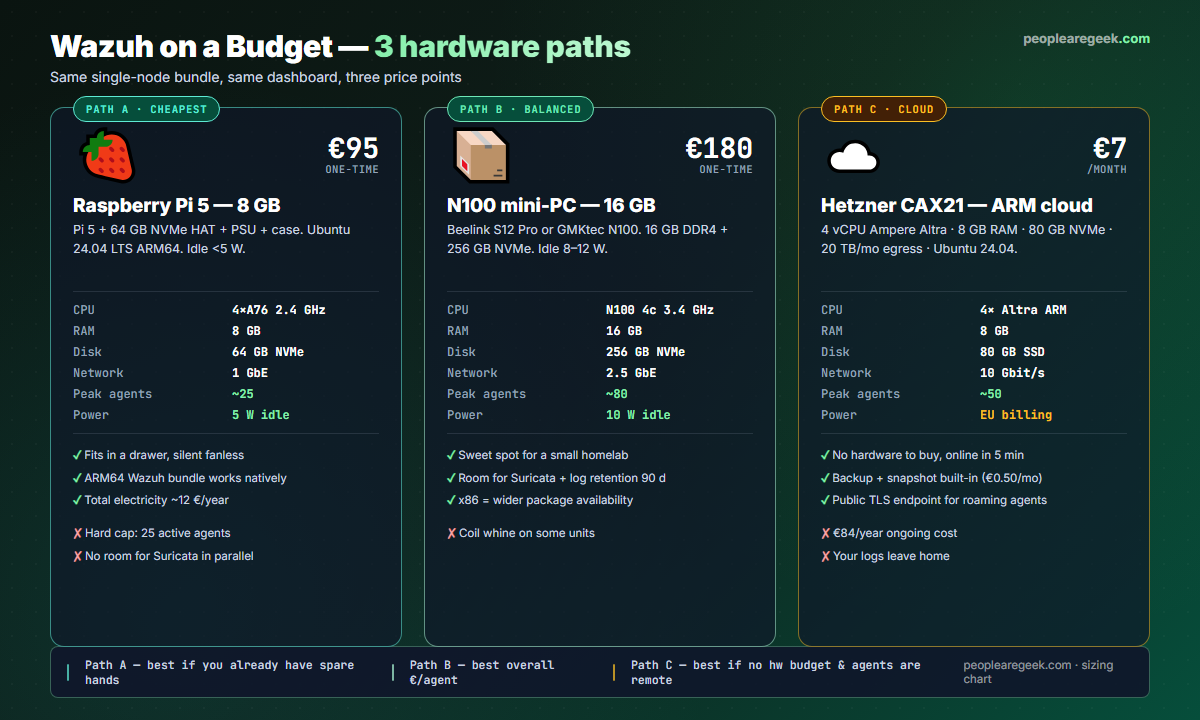
| Hardware | Idle RAM | RAM @ 50 agents | Peak agents | 3-year TCO |
|---|---|---|---|---|
| Pi 5 8 GB | 2.4 GB | 4.2 GB | ~25 | ~107 EUR |
| N100 mini-PC 16 GB | 2.4 GB | 4.2 GB | ~80 | ~210 EUR |
| Hetzner CAX21 | 2.4 GB | 4.2 GB | ~50 | ~252 EUR |
The realistic “peak agents” column above is not a hard limit — it is where the Indexer starts dropping events because the JVM heap is set conservatively and bulk write queues back up. Headroom matters: plan for half your stated peak in steady state, the rest is alert burst capacity.
Path A — Raspberry Pi 5 (~95 EUR)
Best for: home labs, learning, a single household worth of agents.
Bill of materials: Pi 5 8 GB (75 EUR) + NVMe HAT + 64 GB NVMe (28 EUR for the pair) + 27 W official PSU (12 EUR) + passive case (10 EUR) = 95 EUR. Skip the SD card — the NVMe boot is the single biggest reliability win for a 24×7 box. Flash Ubuntu 24.04 LTS ARM64 to the NVMe with rpi-imager, set hostname wazuh-pi, ssh keys at first boot. Once SSH is up:
sudo apt update && sudo apt install -y curl gnupg
ssh-copy-id wazuh-pi.local   # from your laptop
# enable cgroup v2 memory accounting (Wazuh installer requires it on ARM)
sudo sed -i 's/$/ cgroup_enable=memory cgroup_memory=1/' /boot/firmware/cmdline.txt
sudo reboot
Path B — N100 mini-PC (~180 EUR)
Best for: small-shop sysadmins, “the Wazuh box for the office”, labs with Suricata and 90-day retention.
Buy any Intel N100 unit shipped with 16 GB RAM and a 256 GB or 500 GB NVMe — Beelink S12 Pro, GMKtec NucBox G3, or Minisforum UN100 are all viable. Power draw 8–12 W idle, peaks under 25 W. Install Ubuntu 24.04 LTS from a USB stick, no special boot args needed. Two reasons this wins over the Pi: x86 means the entire Wazuh package ecosystem is first-class (no ARM caveats in the docs), and 16 GB lets you run Suricata as a side daemon at ~/var/log/suricata/eve.json tailed by Wazuh.
# after first boot
sudo apt update && sudo apt upgrade -y
sudo apt install -y curl gnupg ufw chrony fail2ban
sudo timedatectl set-timezone UTC
sudo ufw default deny incoming
sudo ufw allow OpenSSH
sudo ufw allow 443/tcp   # Wazuh dashboard
sudo ufw allow 1514/tcp  # agent enrolment
sudo ufw enable
Path C — Hetzner CAX21 ARM cloud (~7 EUR/mo)
Best for: agents that already roam (work laptops, VPS fleet, the cousin’s home server), no home WAN to expose.
Hetzner Cloud’s CAX21 line uses Ampere Altra cores — proper server-grade ARM with consistent performance. 4 vCPU, 8 GB RAM, 80 GB NVMe, 20 TB egress. About 0.0094 EUR/hour, capped at ~7 EUR/month. Order, SSH in within 3 minutes, you’re on Ubuntu 24.04 ARM64. From there the install is identical to Path A, minus the cgroup tweak (the Hetzner Ubuntu image already has it).
The catch on Path C is data residency: your logs leave the home. Hetzner is GDPR-friendly and EU-only by default, but if you are a regulated shop check your DPO’s opinion. The other catch is the public attack surface — see the firewall section below.
The shared install: wazuh-install.sh -a
The single-node bundle is one curl + one script invocation. It takes 7–11 minutes on the Pi, 4–6 on the N100, 5 on Hetzner. Run as root.
cd /root
curl -sO https://packages.wazuh.com/4.10/wazuh-install.sh
sudo bash ./wazuh-install.sh -a
When it finishes, the script prints the admin password and the local dashboard URL (HTTPS, self-signed cert). Save the password — it does not come back if you scroll past it.
Open the dashboard URL from another machine on the same LAN (Path A / B) or via SSH tunnel (Path C — ssh -L 8443:127.0.0.1:443 root@your-vps and visit https://127.0.0.1:8443). Accept the self-signed cert, log in with the admin password the installer just printed. You should land on a working Discover view.
Enrol the first agents
From the dashboard: Agents → Deploy new agent, pick the OS, copy the install command. Three flavours:
# Linux endpoint
curl -sO https://packages.wazuh.com/4.x/apt/pool/main/w/wazuh-agent/wazuh-agent_4.10.0-1_amd64.deb
sudo WAZUH_MANAGER='your-server-ip' dpkg -i wazuh-agent_4.10.0-1_amd64.deb
sudo systemctl enable --now wazuh-agent

# Windows endpoint (PowerShell)
Invoke-WebRequest -Uri https://packages.wazuh.com/4.x/windows/wazuh-agent-4.10.0-1.msi -OutFile wazuh-agent.msi
msiexec.exe /i wazuh-agent.msi /q WAZUH_MANAGER='your-server-ip'
NET START WazuhSvc

# macOS endpoint
curl -sO https://packages.wazuh.com/4.x/macos/wazuh-agent-4.10.0-1.pkg
sudo /usr/sbin/installer -pkg wazuh-agent-4.10.0-1.pkg -target /
echo 'WAZUH_MANAGER="your-server-ip"' | sudo tee /Library/Ossec/etc/preloaded-vars.conf
sudo /Library/Ossec/bin/wazuh-control start
Within 60 seconds the agent appears in Agents as Active. Repeat for every box you own.
Budget tuning: retention, indices, alert noise
Default settings keep 90 days hot. On a 64 GB Pi NVMe with 25 agents you will fill the disk in 6 weeks. Three knobs save you.
- Shorter ILM rollover. Edit
/etc/wazuh-indexer/opensearch.ymland set thewazuh-alertsindex lifecycle to 14 days hot, then delete. Reduces disk by ~80 %. - Disable noisy rule groups. In Management → Rules, filter by group
syslog,sshd,ossecand disable any with hit counts >100 k/day that you do not actually triage. Trim alert-DB writes by ~40 %. - Compress at rest. Switch the indexer’s codec to
best_compressionviaindex.codec. Costs ~5 % CPU, saves ~30 % disk.
For Path C only, lock down the public attack surface: fail2ban on SSH, deny incoming on 1514/tcp except from the agent IP allowlist, certbot a real TLS cert on the dashboard so Chrome stops shouting at you.
FAQ
Will a Raspberry Pi 5 really run Wazuh?
Yes, the 8 GB model runs the single-node bundle comfortably with up to 25 agents and 14 days of retention. The two non-negotiables are the cgroup memory tweak in /boot/firmware/cmdline.txt and an NVMe (or USB SSD) — SD card writes will burn out in months. Power draw stays under 5 W at idle.
How does this differ from the full SOC homelab guide?
The full SOC homelab guide adds a Suricata IDS sidecar and runs Wazuh + Elastic Stack on separate VMs for detection-engineering practice. This budget build runs the single-node bundle on one cheap box, no Suricata, no Elastic separation — the cheapest path that still gives you a working SIEM with a dashboard and rule engine.
Can I add Suricata later if I start on Path A?
Not realistically. Suricata at 100 Mbps + Wazuh single-node simply does not fit in 8 GB RAM. If you want Suricata, start on Path B (N100 16 GB) or stand the IDS up on a second Pi and forward EVE JSON to the Wazuh manager.
Is the Hetzner ARM image really ARM Wazuh-compatible?
Yes — Wazuh ships official ARM64 packages and the CAX21 runs them natively. The performance profile is closer to the N100 than the Pi because the Ampere Altra cores are server-class. The only operational catch is the public endpoint: TLS cert + fail2ban + IP allowlist on agent ports are mandatory.
Can I migrate from Path A to Path B without losing data?
Yes via wazuh-indexer snapshot + restore. Mount a USB disk on the Pi, snapshot the wazuh-alerts indices, copy the disk to the mini-PC, restore. Plan for 30 minutes of downtime. The agents reconnect automatically once the new manager IP matches.
What if I outgrow even Path B?
Two natural next steps. Split the components: move the Indexer onto a second box, keep the Manager + Dashboard on the first one. Or switch to the multi-node bundle on three cloud VMs (€21/mo on Hetzner). Either way, the dashboard config and alert rules transfer untouched — you only re-point endpoints.
Want the detection engineering side?
Pair this build with the full SOC homelab walkthrough — Wazuh + Suricata + Elastic Stack on multiple VMs, MITRE ATT&CK mapping, threat-hunting queries.


