

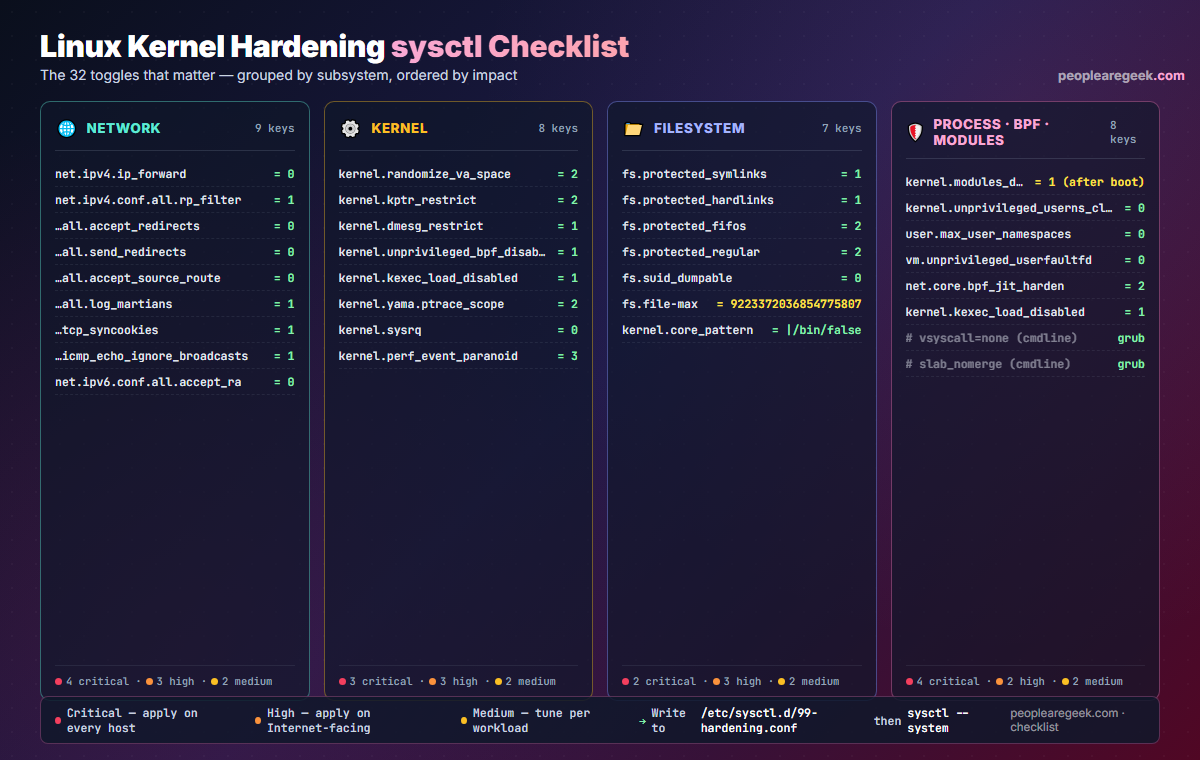
The Linux kernel ships with a defensive default for almost every sysctl — but “almost” is the keyword. Half a dozen of those knobs, left at distribution defaults, give an attacker a foothold or an information leak they should never get. This checklist is the consolidated 32-toggle baseline that the major hardening guides (CIS Distribution Independent Linux, ANSSI BP-028, lynis Heavy mode, Bastille rewrites) all converge toward in 2026 — grouped by subsystem and ordered by impact so you know which ones must ship today and which can wait for your next maintenance window.
Contents
Why sysctl is the cheapest hardening you can ship
SELinux, AppArmor, auditd, Falco — every Linux hardening stack worth deploying takes hours to roll out, and weeks to tune without breaking production. sysctl, on the other hand, takes ten minutes. The 32 toggles in this guide change runtime kernel parameters that are evaluated on every relevant syscall: ASLR strength, ptrace scoping, source-route acceptance, kernel pointer disclosure, BPF JIT spraying countermeasures, FIFO and hardlink traversal protections. None of them requires a reboot. None of them changes user-visible behaviour on a sane workload. They are the closest thing Linux has to a “press here for +30 % security at no operational cost” button.
How to apply the checklist (persistent + audit)
Drop everything into a single file under /etc/sysctl.d/ so the kernel re-applies it on every boot, then reload without a restart. The same file is the source of truth your CI baseline diff against — keep it under version control.
sudo install -m 0644 /dev/null /etc/sysctl.d/99-hardening.conf
sudo tee /etc/sysctl.d/99-hardening.conf > /dev/null <<'EOF'
# === Network ===
net.ipv4.ip_forward = 0
net.ipv4.conf.all.rp_filter = 1
net.ipv4.conf.default.rp_filter = 1
net.ipv4.conf.all.accept_redirects = 0
net.ipv4.conf.all.send_redirects = 0
net.ipv4.conf.all.accept_source_route = 0
net.ipv4.conf.all.log_martians = 1
net.ipv4.tcp_syncookies = 1
net.ipv4.icmp_echo_ignore_broadcasts = 1
net.ipv6.conf.all.accept_ra = 0

# === Kernel ===
kernel.randomize_va_space = 2
kernel.kptr_restrict = 2
kernel.dmesg_restrict = 1
kernel.unprivileged_bpf_disabled = 1
kernel.kexec_load_disabled = 1
kernel.yama.ptrace_scope = 2
kernel.sysrq = 0
kernel.perf_event_paranoid = 3

# === Filesystem ===
fs.protected_symlinks = 1
fs.protected_hardlinks = 1
fs.protected_fifos = 2
fs.protected_regular = 2
fs.suid_dumpable = 0
kernel.core_pattern = |/bin/false

# === User namespaces, BPF hardening ===
kernel.unprivileged_userns_clone = 0
user.max_user_namespaces = 0
vm.unprivileged_userfaultfd = 0
net.core.bpf_jit_harden = 2
EOF
sudo sysctl --system
The --system flag rescans every .conf file under /etc/sysctl.d/, /run/sysctl.d/ and /usr/lib/sysctl.d/ in deterministic order. Run it once per change. There is no reboot. To prove a key was actually written, follow up with sysctl -n <key> and diff against the file.
Network — 9 keys
Networking sysctls are where attackers spend the most time looking for misconfigurations.
net.ipv4.ip_forward = 0— disable IP routing on hosts that are not routers. The default on most distros is already 0, but Docker, kubeadm, libvirt and OpenVPN flip it back to 1 silently. Re-set it after every container/VPN install.net.ipv4.conf.all.rp_filter = 1— strict reverse-path filtering. Drops spoofed source addresses that should not arrive on this interface. Critical on any multi-homed host.net.ipv4.conf.all.accept_redirects = 0andsend_redirects = 0— refuse ICMP redirect messages, which can poison the routing table from the LAN.net.ipv4.conf.all.accept_source_route = 0— rejects packets carrying loose / strict source routing options. There is no legitimate use of these on a modern Internet host.net.ipv4.conf.all.log_martians = 1— logs packets with impossible addresses. Cheap detection of misconfigured routers and clumsy attackers.net.ipv4.tcp_syncookies = 1— enables the syncookies SYN-flood mitigation. Modern kernels have it on by default; reaffirm anyway.net.ipv4.icmp_echo_ignore_broadcasts = 1— closes the ancient smurf-attack amplifier.net.ipv6.conf.all.accept_ra = 0— disables IPv6 Router Advertisement acceptance on hosts that do not need autoconf. Mandatory on routers and on servers behind a controlled fabric.
Kernel — 8 keys
The kernel namespace covers ASLR, kernel-pointer leakage and dangerous legacy interfaces.
kernel.randomize_va_space = 2— full ASLR including the data segment. Required for any reasonable exploit-mitigation posture.kernel.kptr_restrict = 2— hides kernel symbol addresses from/proc/kallsymsfor non-root callers. Defeats the easiest kernel-pointer leak.kernel.dmesg_restrict = 1— restrictsdmesgtoCAP_SYS_ADMIN. Boot-time messages frequently leak addresses and module versions.kernel.unprivileged_bpf_disabled = 1— denies BPF program loading to non-root users. Closes a large family of side-channel and JIT-spraying attacks.kernel.kexec_load_disabled = 1— once set to 1, kexec can no longer be invoked. Prevents an attacker with root from booting a different kernel without a reboot.kernel.yama.ptrace_scope = 2— only root can attachptraceto existing processes. Stops trivial credential lifting via in-memory inspection.kernel.sysrq = 0— disables the Magic SysRq combinations entirely. On servers you do not have a console keyboard anyway.kernel.perf_event_paranoid = 3— deniesperf_event_opento unprivileged users. Closes a known Spectre-class side-channel path.
Filesystem — 7 keys
Filesystem hardening focuses on link / FIFO race conditions and crash-dump leakage.
fs.protected_symlinks = 1andfs.protected_hardlinks = 1— block the classic/tmprace where an attacker symlinks/tmp/footo/etc/passwdbefore a privileged process writes it.fs.protected_fifos = 2andfs.protected_regular = 2— same family for FIFO pipes and regular files in sticky directories.fs.suid_dumpable = 0— SUID binaries never produce a core dump, which would otherwise leak privileged memory.kernel.core_pattern = |/bin/false— pipes any core to/bin/falserather than writing it to disk. Combined withsuid_dumpable=0this nukes crash-dump exfiltration paths entirely. Re-enable a real handler only when actively debugging.
Process, BPF and modules — 8 keys
The last group closes the namespace and module-load attack surfaces.
kernel.modules_disabled = 1— apply this after boot, once every needed module is loaded. Once set, no further module can be inserted, even by root. Devastating for kernel-rootkit persistence.kernel.unprivileged_userns_clone = 0anduser.max_user_namespaces = 0— disables user namespaces for non-root. Container runtimes that need them (rootless Docker, Podman) will fail loudly; flip the keys back on hosts dedicated to those workloads.vm.unprivileged_userfaultfd = 0— blocks the syscall path that enables a sizable class of use-after-free exploits.net.core.bpf_jit_harden = 2— randomises constants in the BPF JIT to thwart JIT-spraying.- Add the boot-time switches
vsyscall=noneandslab_nomergetoGRUB_CMDLINE_LINUXwhile you are at it — they are not sysctls but they belong in the same hardening pass.
kernel.modules_disabled = 1 is a one-way switch. After applying it the host cannot insert new modules without a reboot. Verify your VPN, encrypted-filesystem and graphics modules are all present in lsmod first, then commit.Verify, baseline and re-audit
The reason a checklist is more reliable than tribal knowledge: you can diff the live state against the file. The one-liner below catches anything a misbehaving package or a sysadmin’s sysctl -w has silently flipped.
awk -F '=' '/^[^#]/ { gsub(/ /, "", $1); k=$1; gsub(/ /, "", $2); v=$2;
  cmd="sysctl -n " k " 2>/dev/null"; cmd | getline live; close(cmd);
  if (live != v) printf "DRIFT  %-40s  file=%s  live=%s\n", k, v, live
}' /etc/sysctl.d/99-hardening.conf
Wire that into your nightly cron and you will know within 24 hours if a kernel update, a package post-install, or a container runtime reset one of your knobs. For an automated audit covering more than sysctls, point lynis audit system --pentest at the host — its kernel hardening section maps 1-for-1 against the keys above.
Pitfalls and rollback tips
- Containers / Docker break
ip_forward = 0. If you run Docker or Kubernetes, setnet.ipv4.ip_forward = 1and rely on the container runtime’s per-bridge firewall instead. - Rootless Podman needs user namespaces. Do not apply
kernel.unprivileged_userns_clone = 0on developer workstations that use rootless Podman or rootless Docker. - Performance regressions from
bpf_jit_harden = 2. Hot networking paths that rely on XDP / eBPF see a small CPU hit. Measure before/after on edge proxies. - Crash dumps disappear silently. Once
core_patternis piped to/bin/false, debugging segfaults will be harder. Keep a documented procedure for re-enabling a real core handler temporarily, under change control. - Forgetting
sysctl --system. Editing the file without reloading leaves the live kernel in the old state until the next boot. Always finish with the reload command — and put it in your config-management run.
FAQ
Will any of these break a stock Ubuntu / Debian / RHEL server?
On a stock server role (web, database, mail, DNS): no. The defaults that change are corner cases — Magic SysRq, kernel symbol disclosure, ICMP redirects — that no production service relies on. The two real watchouts are ip_forward = 0 if you also run Docker, and unprivileged_userns_clone = 0 if you run rootless containers.
Why /etc/sysctl.d/99-hardening.conf and not /etc/sysctl.conf?
Three reasons. First, /etc/sysctl.conf is owned by the package on RHEL-family distros and your edits can be overwritten by an update. Second, files under /etc/sysctl.d/ are processed by sysctl --system in numerical order, so 99- guarantees your hardening runs last and wins any conflict. Third, your config-management tool can drop the file atomically without parsing the existing one.
Do I need a reboot after editing the file?
No. sysctl --system rescans the directories and applies every key to the running kernel. The only setting in the checklist that survives a reboot but cannot be toggled live is kernel.modules_disabled — once set to 1, it remains 1 until reboot.
How does this checklist relate to CIS, ANSSI or DISA STIG?
It is the intersection of the four sources, restricted to keys you can safely apply without a workload-specific review. CIS Distribution Independent Linux v1.1 covers all 32. ANSSI BP-028 covers 28 of them. DISA STIG covers the kernel + filesystem subsets and adds auditd configuration on top. The full enterprise hardening involves SELinux / AppArmor profiles and auditd rules in addition to these sysctls.
What about cloud-init or Ansible distribution?
Drop the same 99-hardening.conf into your Ansible role under files/ and ship it with a copy task followed by command: sysctl --system. For cloud-init, embed the file content inside a write_files directive and reference sysctl --system as the runcmd. Treat the file as code — the diff between two versions of the file is the audit trail you want.
Are there any keys you intentionally left out?
Yes: anything performance-tuning (net.ipv4.tcp_* buffers, vm.swappiness, vm.dirty_ratio) and anything storage-specific (vm.vfs_cache_pressure). Those are workload knobs, not security knobs. Tune them in a separate 10-perf.conf so the security baseline stays portable.
Audit the live kernel
Pair the checklist with the SOC homelab walkthrough to ship a SIEM that catches drift in real time — Wazuh + Suricata + Elastic Stack on free, open-source software.


