On July 16, 2026, Cloudflare shipped a wrangler flagship command suite that lets you manage its Flagship feature flag service entirely from the terminal. Until now, Flagship, Cloudflare's edge native flag service built on the open OpenFeature standard, was mostly a dashboard and an API. The new commands close the gap that matters for teams that automate everything: you can create an app, wire it into your wrangler config as a binding, create flags, change a flag's default, and disable a flag as a kill switch, all without leaving your shell. Because it is just the CLI, the same commands run inside CI/CD pipelines, deploy scripts, and even AI agents. For anyone who treats configuration as code, moving flags out of a web console and into version controlled commands is the useful part of this release.
The short answer
On July 16, 2026, Cloudflare shipped a wrangler flagship command suite that manages its Flagship feature flag service from the terminal. You can create an app, add it to your Wrangler config as a binding, create flags, change a flag's default, and disable a flag as a kill switch, all from the shell. Because it is just the CLI, the same commands run in CI/CD pipelines, deploy scripts, and AI agents. Flagship is built on the open OpenFeature standard, so your code reads flags through a vendor neutral interface. At launch it is gated per account.
Feature flags have a familiar failure mode. The flag that controls whether a risky feature is live sits in a web dashboard, managed by clicks, while everything else about your deployment lives in version control and ships through a reviewed pipeline. That split is fine until an incident, when the one lever you most need to pull is in a different system with a different access path. Cloudflare's July 16 release goes at exactly that gap by moving Flagship into Wrangler, the same CLI teams already use to deploy Workers.
What shipped
The new addition is a wrangler flagship command suite. Flagship is Cloudflare's edge native feature flag service, built on OpenFeature, an open standard for feature flagging, and until now it was driven mainly through the dashboard and an API. The CLI brings the core lifecycle into the terminal.
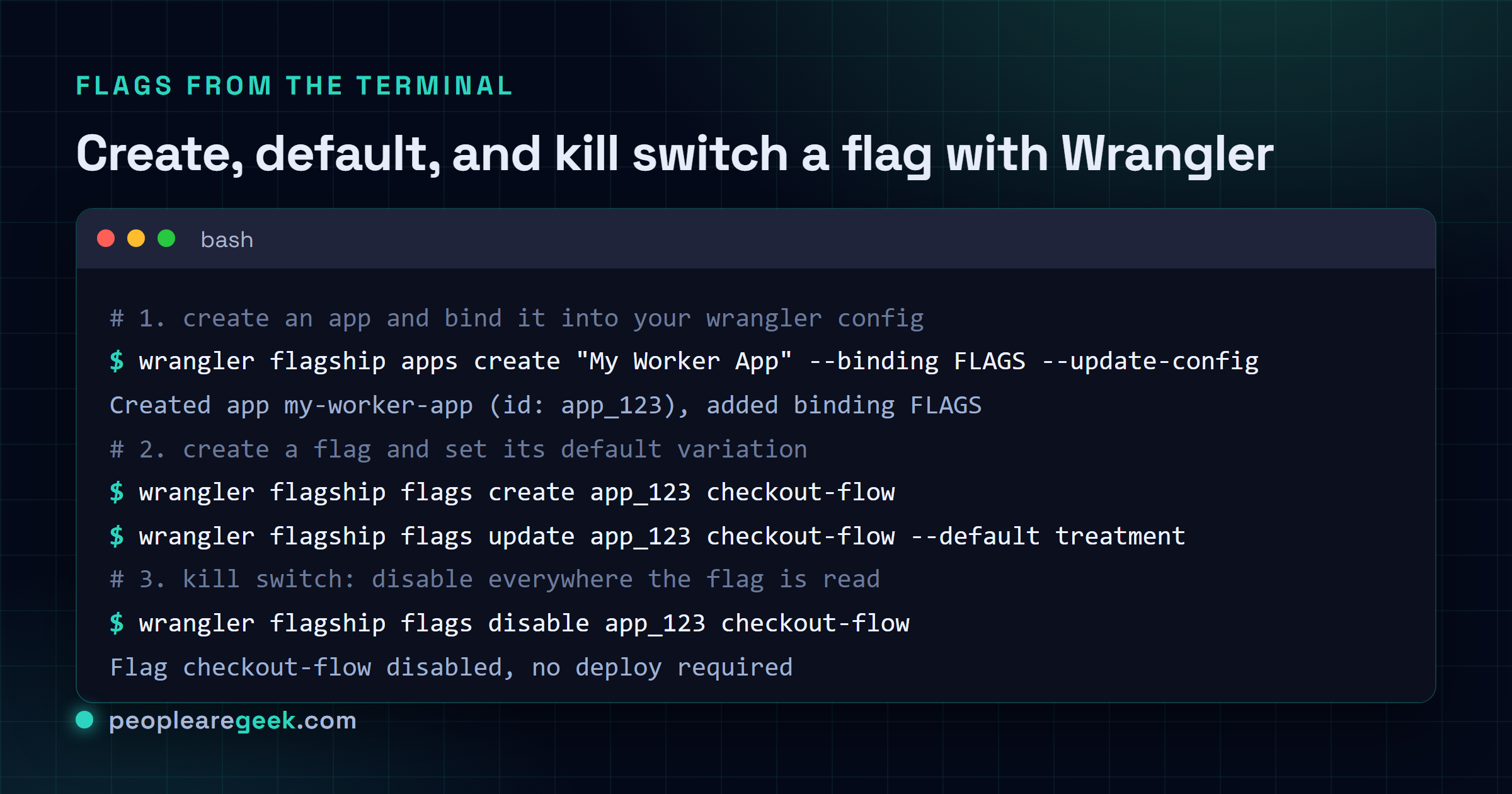
You can create a Flagship app and have Wrangler add it to your wrangler.json or wrangler.jsonc file as a binding, so your Worker reads flags through the same configuration mechanism it uses for every other resource. From there you create flags, set their values, and change how they behave. Flags can hold boolean, string, number, or JSON values, so a flag is not limited to a simple on or off toggle. It can carry structured configuration that your code reads at runtime.
Flags as commands, not clicks
The commands map cleanly onto the day to day flag lifecycle. You create an app and bind it, create a flag, change its default variation, and enable or disable it. The enable and disable commands are the kill switches: one command turns a feature off everywhere the flag is read, no deploy required. Cloudflare also exposes rollout, split, and rules subcommands for gradual releases and targeting, so you can widen exposure or aim a flag at a subset of traffic without shipping new code.
None of these capabilities are new to feature flagging as a concept. What changes is where they live. A dashboard action is a manual step that leaves no diff and no review trail. A command is text. It can sit in a script, go through code review, get logged, and be replayed. That is the whole argument for configuration as code, applied to the one part of a deployment that has stubbornly stayed in a console.

Where this fits: CI/CD, scripts, and agents
Because these are ordinary Wrangler commands, they run anywhere Wrangler runs. That is the practical unlock. A release pipeline can create a flag disabled by default, deploy the code behind it, and only enable the flag once smoke tests pass. A rollback job can flip the same flag off the moment an alert fires, without waiting on a fresh deploy. And because the commands are text, an automated agent can inspect Flagship state, change a flag, or roll a change back as part of a larger workflow.
That last point is where Cloudflare has aimed Flagship from the start, pitching it as feature flagging for the age of AI. The reasoning is straightforward: if software is increasingly changed by automated systems, the controls that gate those changes have to be automatable too. A kill switch is only useful if the thing most likely to need stopping can also reach it. Building on OpenFeature keeps the reading side of that honest, since your code talks to a vendor neutral interface rather than a proprietary SDK, which matters if you ever want to move flag providers without rewriting how your application checks flags.
The trade offs to weigh
This is a genuinely useful release, but there are a few things to keep in mind before you lean on it.
- It is gated at launch. The feature is currently behind a per account flag, so you may need to contact your Cloudflare account team to enable it. Do not assume it is live on your account by default.
- CLI power cuts both ways. The same scriptability that lets a pipeline flip a kill switch lets a bad script or a careless command flip the wrong one. Treat flag changing credentials and automation with the same care as deploy credentials, and keep an audit trail of who or what changed a flag.
- A flag is still a commitment. Moving flags into code makes them easier to create, which makes it easier to accumulate stale flags that no one removes. The old discipline still applies: a flag is temporary scaffolding, and the cleanup is part of the work, not an afterthought.
The headline here is small on its own. A cloud vendor added CLI commands to a service that already existed. But the direction is the one that keeps paying off: take an operational control that used to require a human in a web console, and make it a command that automation, review, and version control can all reach. For teams that already run their infrastructure from Wrangler, that is one less lever stuck outside the pipeline.
Sources and further reading
- Cloudflare changelog: Manage Flagship from the command line with Wrangler
- Cloudflare blog: Introducing Flagship, feature flags built for the age of AI
- Cloudflare changelog: Automatic provisioning for Flagship bindings
- InfoQ: Cloudflare introduces Flagship, an edge native feature flag service built on OpenFeature
Frequently asked questions
What did Cloudflare actually ship?
On July 16, 2026, Cloudflare added a wrangler flagship command suite to its Wrangler CLI. It lets you manage Flagship, Cloudflare's feature flag service, from the terminal. You can create a Flagship app and add it to your wrangler.json or wrangler.jsonc as a binding, create flags, change a flag's default variation, and enable or disable flags directly, without going through the dashboard.
What is Flagship and what is OpenFeature?
Flagship is Cloudflare's edge native feature flag service. Feature flags let you turn functionality on or off, or vary its behavior, without deploying new code. Flagship is built on OpenFeature, an open standard for feature flagging, which means the way your code reads flags is not locked to one vendor's proprietary SDK. Flags can hold boolean, string, number, or JSON values.
Why does managing flags from the CLI matter?
A CLI is scriptable in a way a dashboard is not. Because these are ordinary Wrangler commands, they run inside CI/CD pipelines, deploy scripts, and automated agents. That means flag changes can live in version control, ship through the same review and rollback path as your code, and be driven by automation. The enable and disable commands work as kill switches you can flip from a pipeline the moment something goes wrong.
Is it available to everyone right now?
Not yet by default. At launch the feature is gated behind a per account feature flag, so you may need to contact your Cloudflare account team to have it turned on. The commands also build on earlier July work that added automatic resource provisioning for Flagship bindings, letting Wrangler connect or create a Flagship app during deployment.