Firefox 154 reached the release channel on August eighteenth, 2026, and the developer facing half of it is the interesting half. It ships text-box-trim and the text-box shorthand, the sibling-index() and sibling-count() CSS functions, a native picker UI for time and datetime-local inputs, No-Vary-Search support in the disk cache, and four new iterator methods. The change most likely to surprise you is elsewhere: a page opening a WebSocket to a device on your local network now triggers a permission prompt, which is a compatibility question for anyone whose tooling talks to localhost or to a box on the LAN.
The short answer
Firefox 154 landed on the release channel on August eighteenth, 2026. For developers the notable additions are text-box-trim, text-box-edge and the text-box shorthand, the sibling-index() and sibling-count() functions, a native picker for time and datetime-local inputs, No-Vary-Search support in the disk cache, JSON Viewer breadcrumbs and four new iterator methods. Local Network Access controls now extend to WebSockets, so a page connecting to a device on your LAN prompts first. Video seeking is faster across all platforms.
Browser release notes usually reward skimming. This one rewards reading the developer section, because two of the additions delete patterns that most front end codebases still carry around.
text-box-trim, or the end of magic negative margins
Every font reserves vertical space above and below its letters. That space is real, it is baked into the font metrics, and it is why a heading with margin-top: 24px never actually sits twenty four pixels below the thing above it. For years the fix has been to measure the gap, subtract it with a negative margin, and hope nobody changes the typeface.
Firefox 154 ships text-box-trim, text-box-edge and the text-box shorthand. text-box-trim selects which edges to trim, text-box-edge selects which font metrics to trim to, and the shorthand does both. The result is that the box around your text corresponds to the letters, so the spacing in your CSS is the spacing on screen.
The reason this matters more than it sounds: those negative margin corrections are font specific and size specific. They break on a font swap, they break on a fallback font while a webfont loads, and they are almost never documented. Replacing them with a declarative property removes a small pile of numbers nobody on the team can explain.
sibling-index() and sibling-count()
The second addition is sibling-index() and sibling-count(), which expose an element's position among its siblings and the total number of them as values you can use in calc().
The pattern this replaces is familiar. You want a staggered animation, so you loop over the list in JavaScript and write style.setProperty('--i', index) on every item, or you get a preprocessor to emit fifty nth-child rules. Both work. Both mean the list's visual behaviour depends on script running, or on a build step, rather than on the stylesheet. With sibling-index() a staggered delay is one declaration, and it keeps working when the list is rendered on the server or reordered in the DOM.
The rest of the developer section
A native picker UI arrives for <input type="time"> and <input type="datetime-local">. That is one more reason to check whether the date and time component in your dependency tree is still earning its bundle size.
No-Vary-Search is now honoured by the disk cache. The header lets a server declare that certain query parameters do not change the response, so ?utm_source=x and its absence can share a cache entry instead of splitting into two. If you serve pages that get decorated with tracking or campaign parameters, this is free hit rate, and it is the same class of concern we cover in our work on Core Web Vitals.
The JSON Viewer now shows a breadcrumb path for the selected entry, which is a small quality of life change with an outsized effect when you are digging into a deeply nested API response.
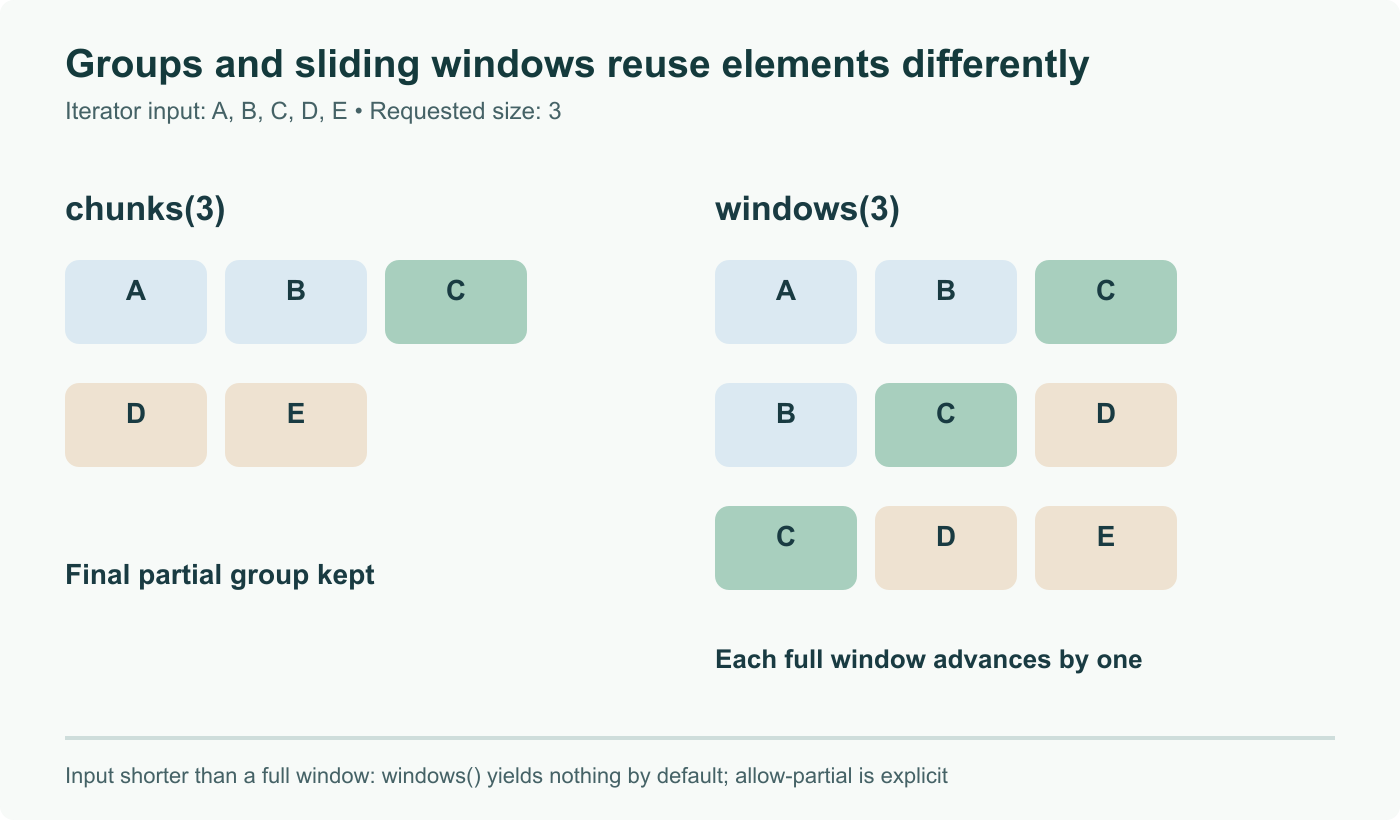
And on the JavaScript side, iterators gain chunks(), windows(), includes() and join(). chunks() groups a sequence into fixed size batches, windows() produces overlapping runs, and the other two do what their array equivalents do. Because these operate on lazy iterators rather than arrays, you can batch a stream without materialising it first, which is the same reasoning that makes them useful in a worker context, a subject we went into in our guide to Web Workers. As always with new syntax, verify support across the browsers you actually target before you rely on it.
The WebSocket change worth knowing about
Firefox already had Local Network Access controls for ordinary requests. Version 154 extends them to WebSocket connections, so a page opening a WebSocket to a device on your local network now asks for permission rather than connecting quietly.
This is not a change most users will see. It is a change developers may well see, because the pattern is everywhere in tooling: live reload servers, device bridges, local hardware dashboards, printer and appliance web interfaces, anything with a browser front end talking to a daemon on the same network. If a connection that used to establish itself now sits waiting, look for the permission prompt before you go debugging your socket code. Worth adding to the onboarding notes for anyone joining a project with a local dev server, alongside the usual cross browser checks we discussed when Servo took its own run at web compatibility.
Everything else
Video seeking is significantly faster on all operating systems, which is the change with the widest reach. PDF text highlighting now matches web page styling and respects system accessibility settings, and the print preview scaling bug with Fit to Page Width is fixed. Profile backup, which already covered Windows and Linux, now includes macOS, and a backup taken on one platform restores on the others. Cookie exemptions are now separate from tracking protection restrictions, so you can keep one site's cookies through a browser restart without loosening anything else. Full page translation now processes iframe content, and language identification runs on every page load so Firefox offers to translate more reliably. Windows users get GeForce NOW support and the ability to choose a different Firefox app icon from Settings. A Manage AI quick action in the address bar opens the AI section of Settings, and Smart Window can suggest tab groups with generated names, rolling out progressively.
Firefox View has moved out of the toolbar by default, which will annoy the people who used it and go unnoticed by everyone else.
Sources and further reading
- Firefox 154.0 release notes, Mozilla, August 18, 2026
- Firefox 154 Adds WebSocket Local Network Protection and New AI Controls, Linuxiac, August 17, 2026
- Firefox 154 Now Available With Manage AI Quick Action, Phoronix, August 17, 2026
- Mozilla Firefox 154 Is Now Available for Download, 9to5Linux
- Firefox 154 released with translation, AI feature and UI tweaks, OMG! Ubuntu, August 2026
Frequently asked questions
What are text-box-trim and text-box-edge for?
They remove the vertical space a font reserves above and below its letters, the leading, so a heading sits where the design says it should rather than floating inside invisible padding. Before these properties, matching a design system's spacing meant hand tuning negative margins per font and per size, and those hacks broke the moment the font changed. text-box-trim says which edges to trim, text-box-edge says which metrics to trim to, and text-box is the shorthand. It is the sort of feature that sounds cosmetic and quietly deletes a whole category of fragile CSS.
What do sibling-index() and sibling-count() do?
They give CSS access to an element's position among its siblings and to the total number of siblings, as numbers usable inside calc() and other expressions. That means staggered animation delays, progressive indentation or per item hue rotation can be expressed directly in CSS instead of being written by JavaScript into inline custom properties, or generated as a wall of nth-child rules by a preprocessor. If you have ever shipped a loop that sets style.setProperty for an index on every list item, this replaces it.
What changes with WebSockets and the local network?
Firefox already applied Local Network Access controls to ordinary requests, and 154 extends them to WebSocket connections. A page that opens a WebSocket to a device on your local network now produces a permission prompt instead of connecting silently. For most users this is invisible. For developers it is worth knowing about, because live reload, device bridges, printer and appliance web interfaces and hardware dashboards frequently use exactly that pattern, and a prompt in the middle of a hot reload loop is confusing the first time you meet it. If something that used to reconnect on its own now waits, this is the first thing to check.
What are the new iterator methods?
Firefox 154 adds chunks(), windows(), includes() and join() to iterators. chunks() splits an iterator into fixed size groups, windows() yields overlapping runs of a given size, includes() tests membership without materialising the sequence, and join() concatenates it into a string. The value is that they work on lazy iterators, including generators and the iterator returned by things like a Map's entries(), so you can batch a stream of items without first collecting it all into an array. Check support in the browsers you target before shipping, since these are new and cross browser availability will lag.
Is there anything here for non developers?
Several things. Video seeking is significantly faster on every operating system, which is the change most people will actually notice. Text selection in the built in PDF viewer now highlights the way it does on a normal web page and respects system accessibility settings. Profile backup, previously Windows and Linux, now covers macOS, and a backup restores across all three. Firefox can suggest groups of related tabs and propose a name for each through Smart Window, rolling out progressively, and a Manage AI quick action in the address bar jumps straight to the AI section of Settings. Windows users can also pick a different app icon from Settings.