LACT 0.10 adds controls, but the first useful change for some NVIDIA users is more reliable telemetry. A temperature label, a fan curve and a voltage control serve different purposes.

What changed on August 12
The release notes add NVIDIA PowerMizer selection and limited voltage-boost headroom, correct Blackwell hotspot readings, and expose supported GDDR6X/GDDR7 chip temperatures. AMD gains a GTT usage display. A setup wizard handles the service configuration. These additions do not establish universal sensor support or an overclocking gain.
Voltage boost is explicitly not a full voltage-offset control. A control that permits a higher operating voltage does not promise a particular clock, temperature or frame rate. Read the detected hardware and driver state before treating the control’s presence as a recommendation to use it.
Read three temperatures as three measurements
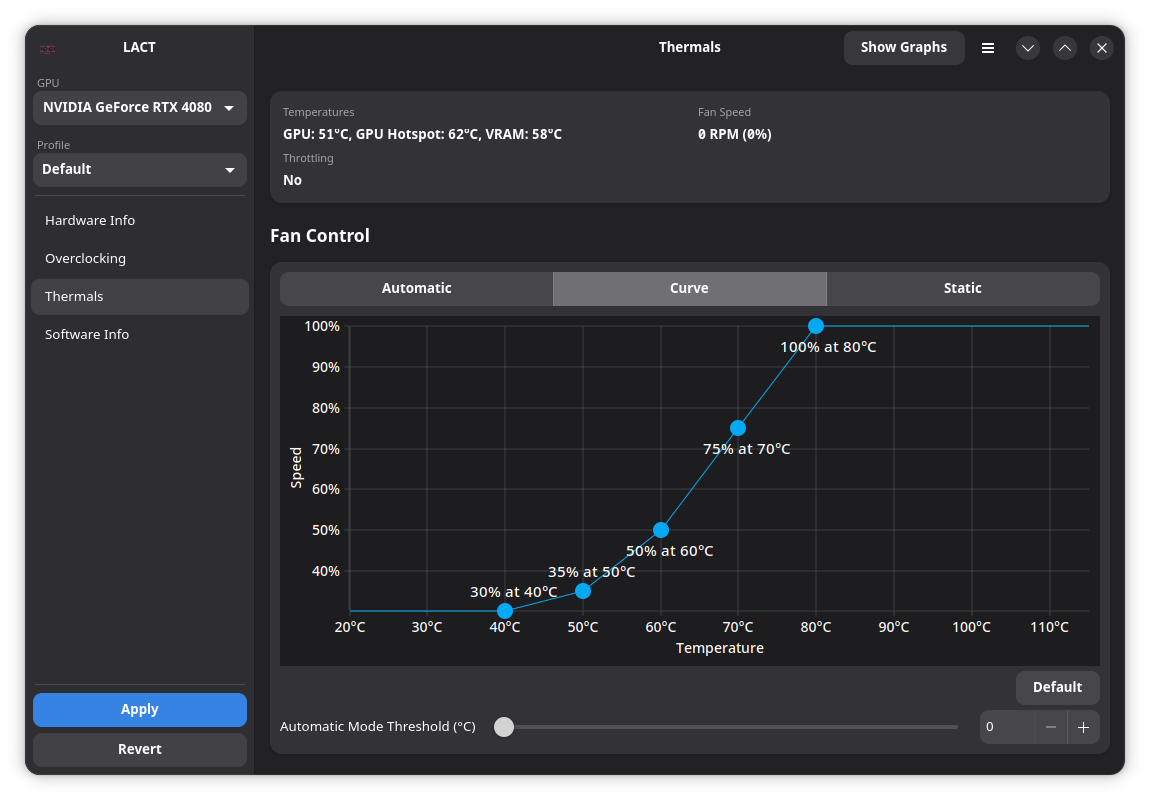
The cover reproduces the project’s earlier thermal-interface screenshot, tracked in the v0.10.0 repository snapshot. It shows an RTX 4080 interface with GPU, hotspot and VRAM labels. It is a visual reference, not a capture of the new Blackwell path, a test by PeopleAreGeek or a recommended fan curve. The repository’s software-information image identifies that screenshot set as 0.9.0-release.
A useful reading order is: identify the sensor, identify the device, then examine the trend under the same workload. A hotspot reading is not interchangeable with a memory-chip reading. Changing a fan curve based on one while believing it represents the other confuses measurement and control.
The screenshot is supplied by Ilya Zlobintsev’s LACT project under its MIT license; the license notice is preserved with our copy.
What the polkit change authorizes
The merged authorization change checks permission when nonempty profile hooks are supplied or configured. It does not justify saying that every later profile switch prompts for a password. Importing a profile containing commands and running an already configured profile are distinct operations.
For an automated setup, inspect the configuration step and installed policy first. Preserve a known configuration before changing controls, then compare telemetry under repeatable conditions. None of the release’s feature descriptions replaces a stability test on the actual card.
Clarify voltage headroom, sensor scope and authorization when configuring hooks; include licensed project thermal screenshot as an earlier interface reference.