DevNews

Meta Ships Muse Glimmer, a 30B Agent Model for One GPU

On this page
  1. What it is, precisely
  2. The part that is actually about agents
  3. Running it without reading a paper
  4. Why the licence is the news
  5. What we would do
  6. Sources and further reading

Meta Superintelligence Labs published Muse Glimmer on August 10, a 30 billion parameter dense model released with open weights under Apache 2.0. The point of it is local agent work: it is distilled from the larger Muse Spark, tuned for tool calling and failure recovery, and quantised builds fit inside roughly 17 GB of memory, which means a 24 GB consumer card or a Mac with enough unified memory can run it without a cloud account. It reads images through a separate perception encoder, handles a default context of 131072 tokens with a documented ceiling of 262144, and arrived with day zero support in llama.cpp, Ollama, LM Studio, vLLM and SGLang.

The short answer

Meta Superintelligence Labs published Muse Glimmer on August 10, a 30 billion parameter dense model with open weights under Apache 2.0. It is distilled from the larger Muse Spark and trained for the thing local agents actually do: call a tool, read the result, and recover when the call fails. Quantised to 4 bit it needs around 17 GB, which puts it on a single consumer GPU or a Mac with enough unified memory. It reads images through a separate perception encoder, covers more than 100 languages, and shipped with day zero support across llama.cpp, Ollama, LM Studio, vLLM and SGLang.

30Bdense parameters, not a mixture of experts
17 GBmemory for the 4 bit build, so a 24 GB card fits it
262kmaximum context window, 131k by default
Answer card: Meta Superintelligence Labs published Muse Glimmer on August 10 2026, a 30 billion parameter dense model under an Apache 2.0 licence, distilled from Muse Spark, tuned for local agent workflows with tool calling and failure recovery, running in about 17 GB of memory at 4 bit quantisation with a context window of 131072 tokens by default and 262144 at most.
Muse Glimmer in one card. Sources: the Meta AI research blog, Phoronix and Unsloth documentation, August 10, 2026. PNG

The number that decides whether a model release matters to you is rarely the parameter count. It is the memory figure, because that is the one that tells you whether the thing runs on hardware you already own.

For Muse Glimmer the answer is about 17 GB at 4 bit. That is the whole story in one line: a 24 GB card holds the weights with room left for context, and a 32 GB Mac does it through unified memory. Meta released the weights on August 10 under Apache 2.0, which is the second number that matters, because it is the licence that decides whether you can ship what you build.

The announcement from the official AI at Meta account, August 10, 2026.

What it is, precisely

Thirty billion parameters, dense rather than a mixture of experts, which is worth stating because dense models of this size behave predictably on a single card in a way sparse ones do not always manage.

It was distilled from Muse Spark, the larger model Meta presented in April, and the training ran in three stages: logit distillation against the teacher, mid training on longer contexts and agentic data, then supervised fine tuning combined with reinforcement learning. The context window is 131072 tokens by default with a documented ceiling of 262144.

Multimodal input arrives through a separate perception encoder rather than a fused architecture, so the model alternates between text and images. In agent terms that means it can look at a screenshot, a chart or a scanned document as part of a task instead of being handed a text description of one. Language coverage runs past a hundred.

The part that is actually about agents

Every model release since roughly 2024 has claimed tool use. The distinguishing detail here is failure recovery.

A local agent spends most of its life in a loop: plan a step, call something, read what came back, decide what next. The step that breaks cheap models is the one where the tool call returns an error, an empty result, or output in a shape the model did not expect. A model that cannot notice that will keep going as though it succeeded, and you find out three steps later when the run is unrecoverable.

Meta trained specifically for that path, along with long running tasks and retry logic. Alexandr Wang, Meta's chief AI officer, described the target as planning, tool calls, checking results and recovering from failures, which is a more honest description of agent work than most launch copy manages.

Bar chart comparing the memory needed by Muse Glimmer 30B at different quantisation levels, from 12 to 14 GB at 2 bit, 14 to 15 GB at 3 bit, 17 GB at 4 bit, 20 to 22 GB at 6 bit, 34 GB at 8 bit and 58 GB at full BF16 precision.
Memory for the weights alone, by quantisation. Source: Unsloth documentation for Muse Glimmer 30B, August 2026. Long contexts add a KV cache on top of these figures. PNG

Running it without reading a paper

The fastest route is Ollama, which picked the model up in version 0.32.7, or LM Studio if you want a window rather than a shell.

If you are going through llama.cpp directly, the invocation that works is llama-cli --model Muse-Glimmer-30B-UD-Q4_K_XL.gguf --mmproj mmproj-BF16.gguf --temp 1.0 --top-p 0.95 --top-k 64, where the --mmproj file is the multimodal projector you need only if you want image input.

Those sampling values deserve a note, because they are Meta's own defaults and they are higher than the ones people habitually use for code. If your reflex is to set temperature to 0.2 for anything technical, resist it here. The model was tuned at 1.0, and clamping it can make agentic behaviour worse rather than more reliable.

On the serving side, vLLM and SGLang both had support on day one. LMSYS reported around 230 tokens per second on a single RTX 5090 using NVFP4 weights with the DFlash drafter enabled, and said it also worked out of the box on RTX Pro 6000, DGX Spark and MLX on Mac. Meta's own speculative decoding figures are a 3.1 times decode speedup on an RTX 5090, 1.8 times on an M5 Max and 1.5 times on an M4 Max.

Why the licence is the news

Apache 2.0 is a change of posture, not a detail.

Meta's previous open weight models carried a community licence with acceptable use terms and a threshold above which large deployers had to ask permission. That was enough friction to send anyone building a commercial product into a legal review before they could even prototype. Apache 2.0 removes the review: commercial use, modification, redistribution and fine tuning are all granted, and what you owe in return is keeping the licence and attribution notices intact.

Mark Zuckerberg framed the release around the United States leading an open source AI ecosystem, published alongside a long essay on AI the same day, and said open weights for Muse Spark 1.2 will follow in the coming weeks. Read the licence choice against the permissively licensed Chinese models of the last year and the strategy is not subtle.

What we would do

If you already run a local model for automation, this is worth benchmarking against what you have rather than swapping in blind. Our guide to running Qwen 3.7 locally covers the measurement setup, and the same method applies: run your own task set, not a leaderboard.

If you are building a local agent from scratch, this is a better starting point than most, and the reason is the failure recovery training rather than the benchmark scores. Our walkthrough for building a local AI agent with Ollama gets you a working loop, and Muse Glimmer drops into it as the model.

If you are on a 16 GB card, do not assume the 3 bit build is fine. Test it on your actual prompts before committing, because degradation in agentic reliability is much harder to spot than degradation in prose quality, and it costs you far more when it happens.

Sources and further reading

Frequently asked questions

What hardware do I actually need to run Muse Glimmer?

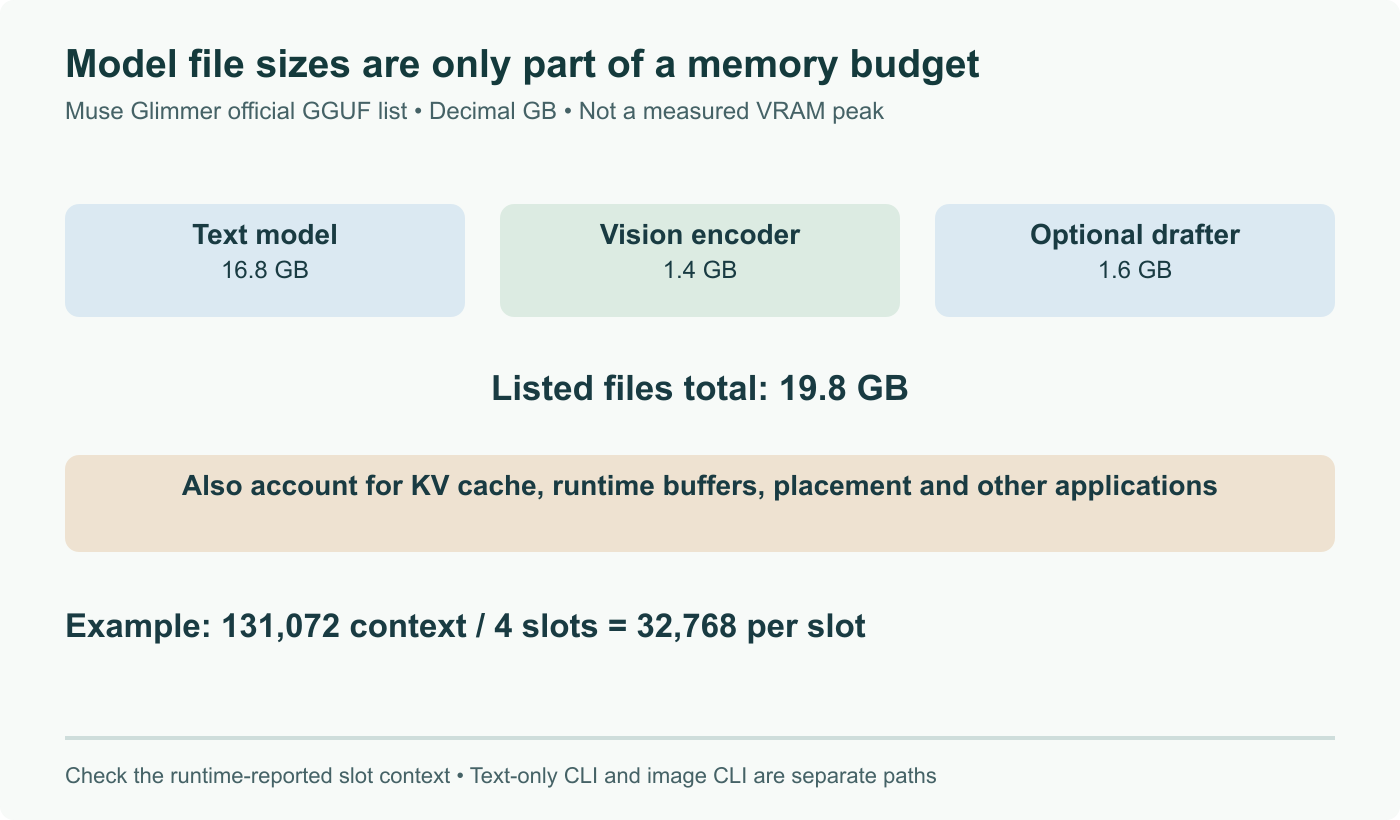
It depends entirely on the quantisation you pick, and the spread is wide. The full BF16 weights want around 58 GB, which puts them outside consumer hardware and into workstation or server territory. The 4 bit build that most people will use needs roughly 17 GB, so a 24 GB card such as an RTX 4090 or 5090 holds it comfortably with room for context, and a 32 GB Mac handles it through unified memory. If you drop to 3 bit you are looking at 14 to 15 GB, and 2 bit gets you into the 12 to 14 GB range at a quality cost you should measure rather than assume. Note that those figures are for weights: long contexts add a KV cache on top, and at 131072 tokens that is not a rounding error.

What does Apache 2.0 change compared to the licences Meta used before?

It removes the conditions. Meta's earlier open weight releases came with a community licence that carried acceptable use terms and, above a user threshold, a requirement to ask permission. Apache 2.0 has none of that. You can use the weights commercially, modify them, redistribute them, and fine tune them into a product without a separate agreement, provided you keep the licence and attribution notices. For anyone who has had to run a licence review before putting a model into a shipped product, that is the difference between a legal conversation and a download. It also puts Muse Glimmer on the same footing as the permissively licensed models coming out of China, which is plainly part of the reasoning.

Is a 30B model good enough to drive a real coding agent?

For a scoped agent, often yes, and that is the honest framing rather than a claim that it replaces a frontier model. Muse Glimmer was trained specifically for the loop that agents run: plan a step, call a tool, read the result, notice when the call failed, and try something else. That last part is where small models usually fall apart, because a model that cannot recognise its own failed tool call will happily keep going. Where it will still lose to a frontier model is long horizon reasoning over a large unfamiliar codebase. Our practical read is that it is a strong fit for repetitive local automation, file and log work, and evaluation jobs, and a weaker fit for open ended architecture work.

How do I run it with llama.cpp?

Pull a GGUF build, then point llama-cli at both the model file and the multimodal projector if you want image input. A working invocation is `llama-cli --model Muse-Glimmer-30B-UD-Q4_K_XL.gguf --mmproj mmproj-BF16.gguf --temp 1.0 --top-p 0.95 --top-k 64`. Those sampling values are Meta's own defaults rather than something we picked, and they matter more than usual here: the model was tuned at temperature 1.0, so dropping it to the 0.2 you might habitually use for code can make agentic behaviour worse rather than better. If you would rather not touch flags at all, Ollama picked the model up in 0.32.7 and LM Studio ships a graphical route to the same weights.

What is the DFlash drafter and is speculative decoding worth enabling?

DFlash is a small companion model shipped alongside Muse Glimmer that drafts several tokens ahead so the big model can verify a batch of them at once instead of producing one at a time. Meta reports a 3.1 times decode speedup on an RTX 5090, 1.8 times on an M5 Max and 1.5 times on an M4 Max, and LMSYS measured around 230 tokens per second on a single RTX 5090 with NVFP4 weights and DFlash enabled. It is worth enabling for interactive use, where latency is what you feel. It is less obviously worth it for batch throughput, since verification work competes with the batch, which is why vLLM treats speculative decoding as a trade rather than a free win.