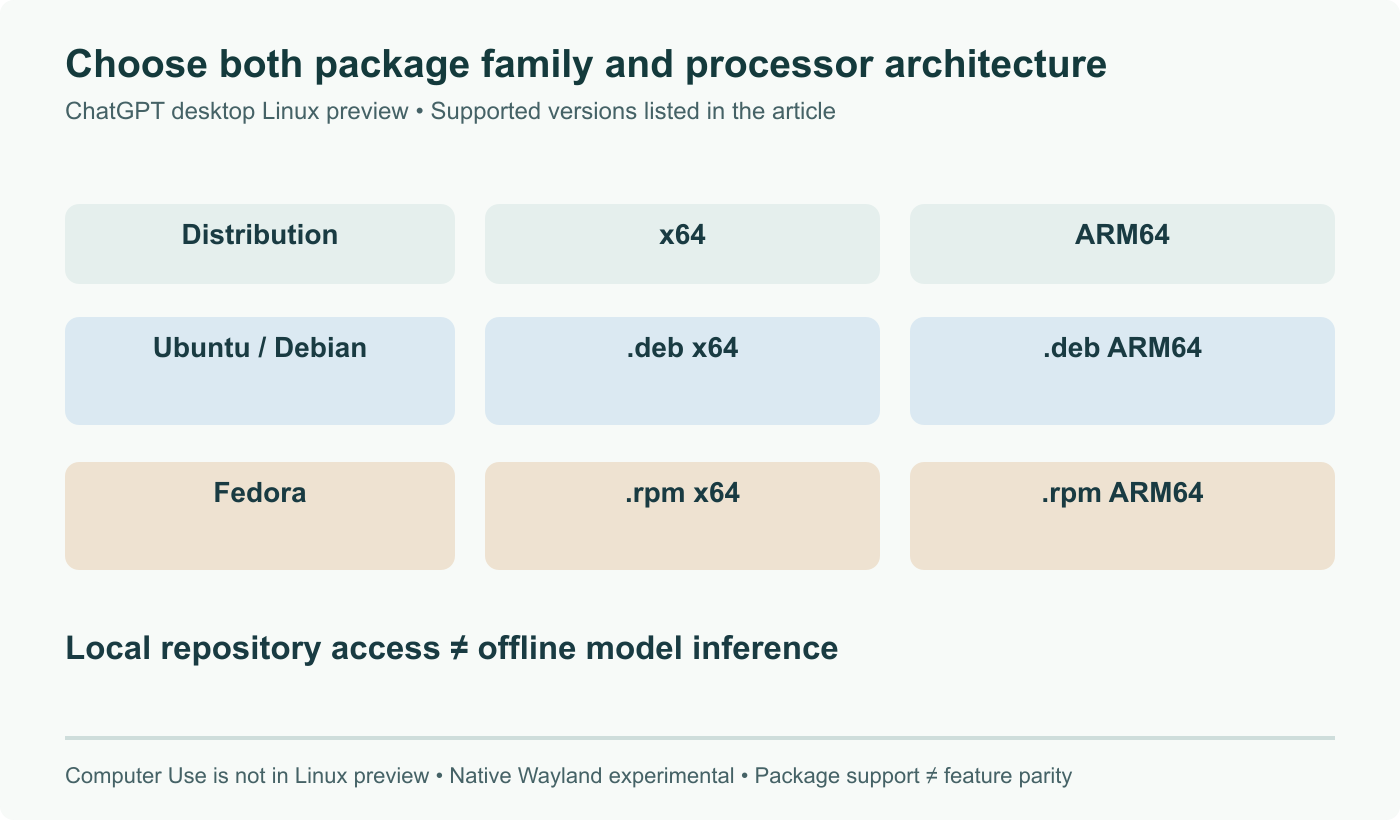
OpenAI released a Linux build of its ChatGPT desktop app on August 11, 2026, in public preview, and the interesting part is not that ChatGPT now has a window. It is that Codex comes with it, running against repositories on your own disk. The packages are native deb and rpm builds for x64 and ARM64, validated on Ubuntu 24.04 and 26.04 LTS, Debian 13 and Fedora 43 and 44. Installing the deb also adds an OpenAI apt repository to your system, which is a detail worth knowing before you run the installer rather than after. The app itself stays closed source.
The short answer
OpenAI released the ChatGPT desktop app for Linux in public preview on August 11, 2026, bundling ChatGPT, ChatGPT Work and Codex in one native application. It ships as deb and rpm packages for x64 and ARM64, validated on Ubuntu 24.04 and 26.04 LTS, Debian 13 and Fedora 43 and 44. Codex can run against local repositories, and installing the deb adds an OpenAI apt repository for updates.
Linux users are used to being third in line, and often to being handled by a community wrapper rather than the vendor. So the notable thing about OpenAI's August 11, 2026 release is not the existence of a ChatGPT window on Linux. It is that the packages are native, signed, plumbed into apt and dnf, and built for ARM64 as well as x64.
OpenAI's own framing was that Linux had been one of the most requested platforms for the desktop app.
What is actually in the box
The application bundles three things that used to be separate: ChatGPT, ChatGPT Work, and Codex. There is also a browser built into the app for workflows that need one.
Codex is the reason a developer would install this rather than keeping a tab open. It runs against repositories on your local disk. That is a materially different arrangement from pasting a file into a chat box, and it is the same shift we have seen across the tooling landscape, where portable agent plugins and local model runners have both been pulling work back onto the machine it concerns.
The app can also read local files without an upload step, and hook into other applications through extensions.
The packaging details that matter
Native deb and rpm packages, x64 and ARM64. Validated on desktop Ubuntu 24.04 LTS, Ubuntu 26.04 LTS, Debian 13, and Fedora 43 and 44. Download is via openai.com/codex.
The detail worth pausing on: installing the deb registers an OpenAI apt repository on your system so that updates flow through normal package management.
For a desktop application that needs to stay current, that is the correct design. It also means a vendor repository is now part of your update path and its signing key is in your trust store. On a personal workstation, that is a fair trade. On a fleet you are responsible for, it is a decision that belongs in policy rather than in whatever each engineer happened to click, and the usual answer is to mirror the repository internally.
It is closed source, and that is worth saying out loud
The Linux client is proprietary. The packages are prebuilt binaries. Free to use with a basic OpenAI account, with some features behind a paid subscription.
This needs stating because everything about the delivery looks like an open source project. A support matrix of distributions, native packages, an apt repository, ARM64 builds. None of that changes what is inside, which is a closed application distributed on the same terms as most commercial Linux desktop software.
Known rough edges
It is a public preview and OpenAI says so: it may be buggy, integrations may not work reliably, and it is not something to depend on for critical work.
One concrete issue has already surfaced in OpenAI's developer community. Input method editors misbehave on Fedora KDE under Wayland, which breaks Japanese and Korean input. Launching with --enable-wayland-ime resolves it. Anyone who has run Electron style applications on Wayland will recognise both the symptom and the fix.
A second, more mundane report: the Linux downloads were not consistently offered to browsers identifying as Windows, which sent at least one person to a virtual machine to fetch the packages.
Why this lands the way it does
The pattern here is not really about one application. Vendors that treated Linux as a server target and a desktop afterthought have been quietly changing that calculation, because the people building with these tools are disproportionately on Linux workstations. Publishing ARM64 desktop packages on day one, rather than a year later, is the part that signals this was not a checkbox exercise.
Whether it earns a place on your machine depends on one question: do you want an agent with direct access to your local repositories and files, from a closed source binary, updated through a vendor repository. That is a reasonable yes for many people and a firm no for others, and the preview label means neither answer needs to be final this week.
Sources and further reading
- OpenAI Brings ChatGPT Desktop App To Linux, Phoronix, August 11, 2026
- Codex in ChatGPT desktop app for Linux is now in preview, OpenAI Developer Community, August 11, 2026
- ChatGPT desktop app is now available for Linux in preview, OMG! Ubuntu, August 11, 2026
- OpenAI launches ChatGPT desktop app for Linux, TechCrunch, August 11, 2026
- OpenAI Launches Official ChatGPT Desktop App for Linux in Preview, Linuxiac, August 11, 2026
Frequently asked questions
What does the desktop app do that the browser does not?
Three things. It runs Codex against repositories on your local disk, so the code stays where it is instead of being pasted into a text box. It can read local files directly for the same reason. And it hooks into other applications through extensions, which the browser tab cannot do. There is also a built in browser inside the app for workflows that need one. If none of those matter to you, the web version does the same job and does not add a package repository to your system. The case for the desktop build is specifically the local repository and local file access.
Which distributions are supported, and what happens on the ones that are not?
OpenAI validated the preview on desktop variants of Ubuntu 24.04 LTS, Ubuntu 26.04 LTS, Debian 13, and Fedora 43 and 44. Packages ship as deb and rpm for both x64 and ARM64. That list is what has been tested, not a hard technical boundary: an rpm on another RPM based distribution or a deb on a Debian derivative will very often install and run. It also will not be supported, and in a preview whose own release notes warn about unreliable integrations, running outside the tested set means any bug you hit is yours to diagnose.
The deb adds an OpenAI repository. Is that a problem?
It is a choice you should make deliberately rather than discover. Installing the deb package registers an OpenAI apt repository so the app updates through normal package management, which is genuinely the right design for a desktop application that needs to stay current. It also means a third party repository now has a say in your update path, and its GPG key sits in your trust store. On a personal workstation that is a reasonable trade for automatic updates. On a managed fleet it is a policy question, and the answer is usually to mirror the repository internally rather than to let every machine reach out on its own.
Is the app open source?
No. The Linux client is closed source and proprietary, shipped as prebuilt deb and rpm packages. It is free to use with a basic OpenAI account, and some features require a paid subscription. This is worth stating plainly because the packaging looks native and the distribution list reads like an open source project's support matrix, which can create the wrong impression. What you are installing is a binary blob with a package manager wrapper around it, on the same terms as most other commercial Linux desktop software.
Any known problems in the preview?
One has already surfaced in OpenAI's own developer community: input method editors misbehave on Fedora KDE under Wayland, which breaks Japanese and Korean input. Users reported that launching with the `--enable-wayland-ime` flag resolves it, which is a familiar workaround for Electron style applications on Wayland. Beyond that, OpenAI's own framing is the relevant warning. This is a public preview, integrations may not work reliably, and it is not the thing to put in front of production work yet.