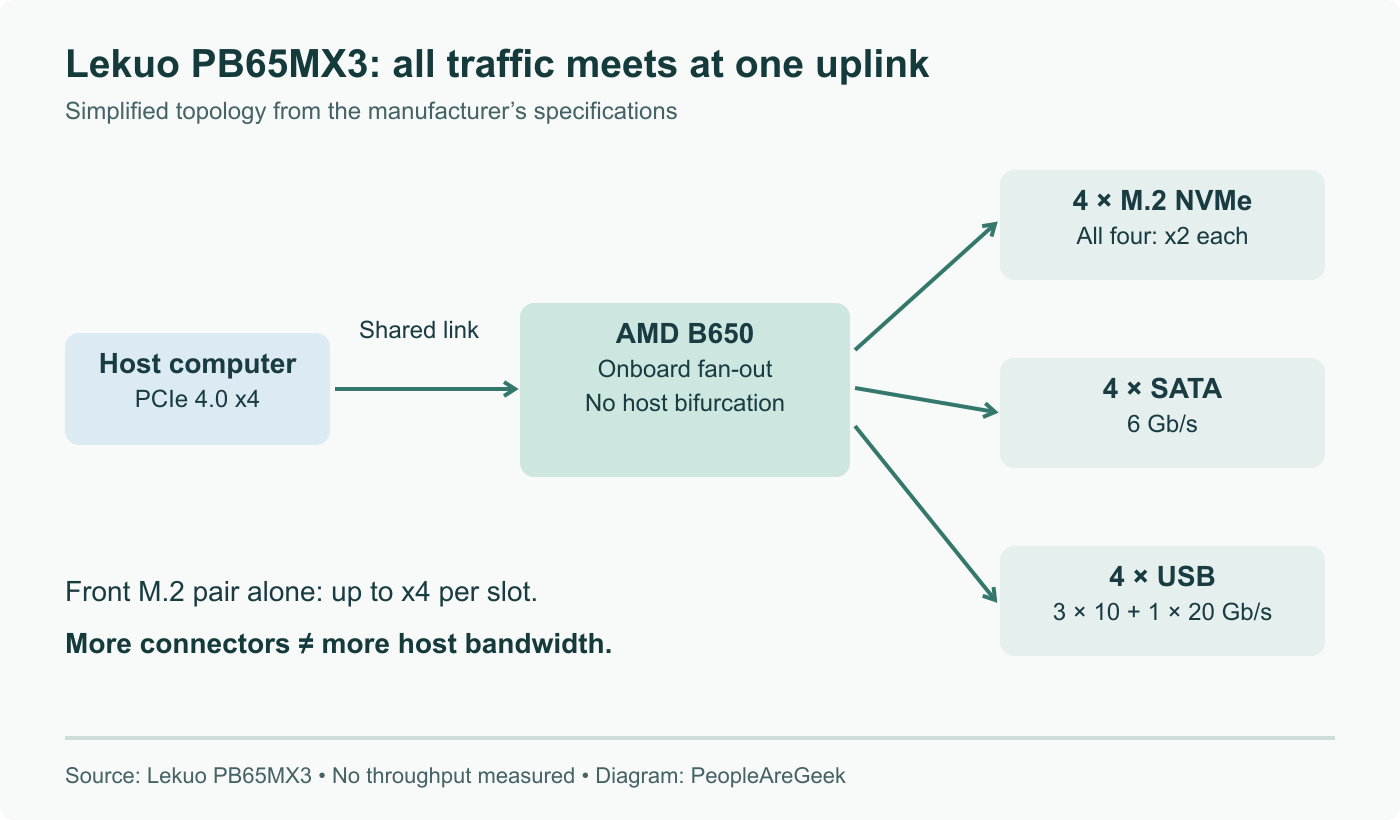
Most I/O expansion cards ask you to trust an obscure controller with an out of tree driver. The Lekuo SouthBridge Max PB65MX3, reviewed on September 1, 2026, takes a different route: it solders an AMD B650 desktop chipset onto a PCIe 4.0 x4 add-in card. The result is four M.2 NVMe slots, four SATA 3.0 ports, two 10 Gbps USB-A ports and two USB-C ports, one at 10 Gbps and one at 20 Gbps, for around 120 US dollars. The clever part is not the port count. It is that Linux sees an AMD 600 Series chipset, which means the drivers involved are the best tested ones in the tree.
The short answer
The Lekuo SouthBridge Max PB65MX3 puts an AMD B650 motherboard chipset onto a PCIe 4.0 x4 add-in card, turning four lanes into four M.2 NVMe slots, four SATA 3.0 ports, two 10 Gbps USB-A ports, one 10 Gbps USB-C port and one 20 Gbps USB-C port. Because the silicon is a mainstream AMD chipset, Linux recognises it as an AMD 600 Series chipset and uses drivers that every AMD desktop since 2022 has been exercising. Testing on a Ryzen 7 8700G running Ubuntu 26.04 with Linux 7.0 found everything working out of the box. The constraint is the shared x4 uplink, which one fast NVMe drive can saturate on its own.
We do not usually write about add-in cards, because most of them are a controller nobody has heard of, a driver situation that resolves badly, and a forum thread of people discovering that the third SATA port stops working under load. This one is worth the exception, and the reason is an idea rather than a spec sheet.
The chipset was always an I/O expander
Think about what a motherboard chipset actually does. The CPU exposes a limited number of PCIe lanes. Some go to the graphics slot, some to a primary NVMe slot, and a handful go to the chipset. The chipset takes those few lanes and fans them out into everything else on the board: the SATA ports, the USB ports, the secondary PCIe slots. It is a switch with integrated controllers.
There is nothing in that job description that requires being soldered to a motherboard. Lekuo put an AMD B650 onto a PCIe add-in card, and the SouthBridge Max PB65MX3 is the result. Plug it into a PCIe 4.0 x4 slot and it fans those four lanes out into four M.2 NVMe slots, four SATA 3.0 ports, two 10 Gbps USB-A ports, one 10 Gbps USB-C port and one 20 Gbps USB-C port.
That is a second southbridge for a machine that has run out of places to plug things in.
The part that matters is what lspci says
Here is the argument for this design over a conventional expansion card. Under Linux, the SouthBridge Max shows up as an AMD 600 Series chipset. Nothing exotic. No out of tree module, no firmware blob to source, no kernel version floor beyond what any recent distribution ships.
That is a materially different risk profile from the usual I/O card. When a card is built around a less common SATA or USB controller, you are depending on driver code that a comparatively small number of people run, whose quirks are discovered slowly, and which sometimes needs a newer kernel than your distribution has. AMD 600 Series chipset support is exercised by every AMD desktop built since 2022. If there were a problem, it would have surfaced in a very large population long before it reached you.
The review reports exactly that outcome: SATA drives, NVMe drives, USB-A and USB-C all working out of the box, with no driver problems. It works on Windows and macOS as well, though Linux is where the argument is strongest.
What the x4 uplink means in practice
Everything on the card shares one PCIe 4.0 x4 connection to the host. That is around eight gigabytes per second of theoretical bandwidth, and less once protocol overhead is accounted for.
A single PCIe 4.0 NVMe drive can use most of that on its own. So the four NVMe slots, four SATA ports and four USB ports are a connectivity count, not a bandwidth budget. Populate the card fully and drive all of it hard simultaneously and everything contends for the same uplink. The reviewer is direct about this: fully leveraging all the I/O capabilities means bandwidth constraints.
The testing bears out the other half of that statement. On an AMD Ryzen 7 8700G running Ubuntu 26.04 with the Linux 7.0 kernel, a PCIe Gen4 Seagate FireCuda 520 was benchmarked in an MSI PRO B850-P WIFI motherboard slot and then behind the SouthBridge Max. Across various real world workloads, performance was in line with expectations for a single SSD. With one active device there is no contention, so the card costs nothing measurable.
That is the honest framing for this product. It is not a way to get more aggregate bandwidth out of a machine. It is a way to get more devices attached to a machine that has bandwidth to spare and connectors to spare not at all.
The other limit is generation. This is PCIe 4.0, not 5.0, so a Gen5 NVMe drive placed in one of these slots will run at Gen4 speeds. The reviewer explicitly hopes Lekuo iterates toward a PCIe 5.0 version, or a variant with more lanes, and both would be genuinely useful.
Physically, it is a small card
The board measures 69 by 174 mm and is low profile. The kit ships with both standard and low profile expansion brackets, copper standoffs and screws for mounting the NVMe drives, and a manual. There is a 6-pin PCIe power connector on the card for when you attach enough devices that slot power is not sufficient.
Current pricing is around 120 US dollars.
Where this actually fits
The obvious case is a small form factor or mini ITX build. Those boards typically have one or two M.2 slots, a handful of SATA ports, and one usable PCIe slot. If that slot is not carrying a graphics card, this turns it into most of a full size board's rear I/O and storage complement without changing the case.
The second case is a home server or workstation that has outgrown its motherboard but not its CPU. Replacing the board means replacing the machine's foundation and rebuilding around it. A card moves with you to the next machine. If you are weighing that decision more broadly, our guide to choosing a mini PC for a homelab covers the trade offs on the other side.
The case where you should not buy this is the one where you need four drives running at full speed at the same time. Video editing scratch arrays, database servers, anything where sustained parallel throughput is the point. There the answer is lanes, which means a platform with more of them, not a fan out from four.
For everyone else, the appeal is a card that adds a lot of connectors and asks the kernel to do nothing it has not already done a million times. That is a rarer property in expansion hardware than it should be.
Sources and further reading
- Lekuo SouthBridge Max Puts An AMD B650 Chipset Onto A PCIe Card For More I/O, Phoronix, September 1, 2026
- Lekuo SouthBridge Max PB65MX3 product page
Frequently asked questions
What is the actual trick here?
A motherboard chipset is already an I/O expander. Its whole job is to take a handful of PCIe lanes from the CPU and fan them out into SATA ports, USB ports and additional PCIe lanes. Lekuo took that observation to its conclusion and put an AMD B650 chipset, normally soldered to a motherboard, onto a PCIe add-in card instead. The card plugs into a PCIe 4.0 x4 slot and fans those four lanes out into four M.2 NVMe slots, four SATA 3.0 ports, two 10 Gbps USB-A ports, one 10 Gbps USB-C port and one 20 Gbps USB-C port. Functionally it is a second southbridge for a machine that has run out of connectors.
Why does the chipset choice matter for Linux?
Because driver quality on expansion cards is where these products usually fail. A card built around a less common SATA or USB controller can require out of tree modules, extra firmware, or a kernel newer than what your distribution ships, and its quirks get found by a small number of users. AMD 600 Series chipset support in Linux is exercised by every AMD desktop built since 2022. Via lspci the card simply appears as an AMD 600 Series chipset, and the review reports everything working out of the box with SATA drives, NVMe drives, USB-A and USB-C, with no driver problems. The card also works on Windows and macOS.
What are the real limits?
Bandwidth, and the PCIe generation. Everything on the card shares a single PCIe 4.0 x4 uplink, which is roughly eight gigabytes per second in theory and less in practice. One PCIe 4.0 NVMe drive can saturate that on its own. So four NVMe slots plus four SATA ports plus four USB ports is a connectivity count, not a bandwidth budget: run all of it hard at once and everything contends. It is also PCIe 4.0 rather than 5.0, so a Gen5 drive in one of those slots will run at Gen4 speeds. The reviewer explicitly hopes for a future PCIe 5.0 version or a variant with more lanes.
How did it perform in testing?
Testing was done on an AMD Ryzen 7 8700G system running Ubuntu 26.04 with the Linux 7.0 kernel. A PCIe Gen4 Seagate FireCuda 520 NVMe SSD was benchmarked first on an MSI PRO B850-P WIFI motherboard slot and then through the SouthBridge Max, and across various real world workloads the results were in line with expectations for a single SSD. That is the correct outcome for a single drive: with only one device active there is no contention for the x4 uplink, so the card should not cost you anything measurable. Stability was the other reported result, with no driver problems during testing.
Who should actually buy one?
People with a small form factor or mini ITX machine that has spare PCIe but no connectors, and people running a home server or workstation that has outgrown its board. It is a low profile card measuring 69 by 174 mm, and the kit ships with both standard and low profile brackets, copper standoffs and screws for the NVMe drives, and a manual. There is a 6-pin PCIe power connector on the card for when you populate it heavily. At around 120 US dollars it competes with buying a bigger motherboard, and unlike a motherboard swap it moves with you. If your workload needs four drives running flat out simultaneously, buy lanes instead.